Choose the drawing set
Add individual DWGs or a folder, then choose copies or deliberate in-place processing.
BatchDraft for AutoCAD runs your AutoLISP routines and command sequences across DWG files using AutoCAD Core Console. Save your setup, process drawing copies, and review each drawing’s result.
Windows x64 · AutoCAD and BricsCAD hosts · Trial supports up to 10 drawings per run
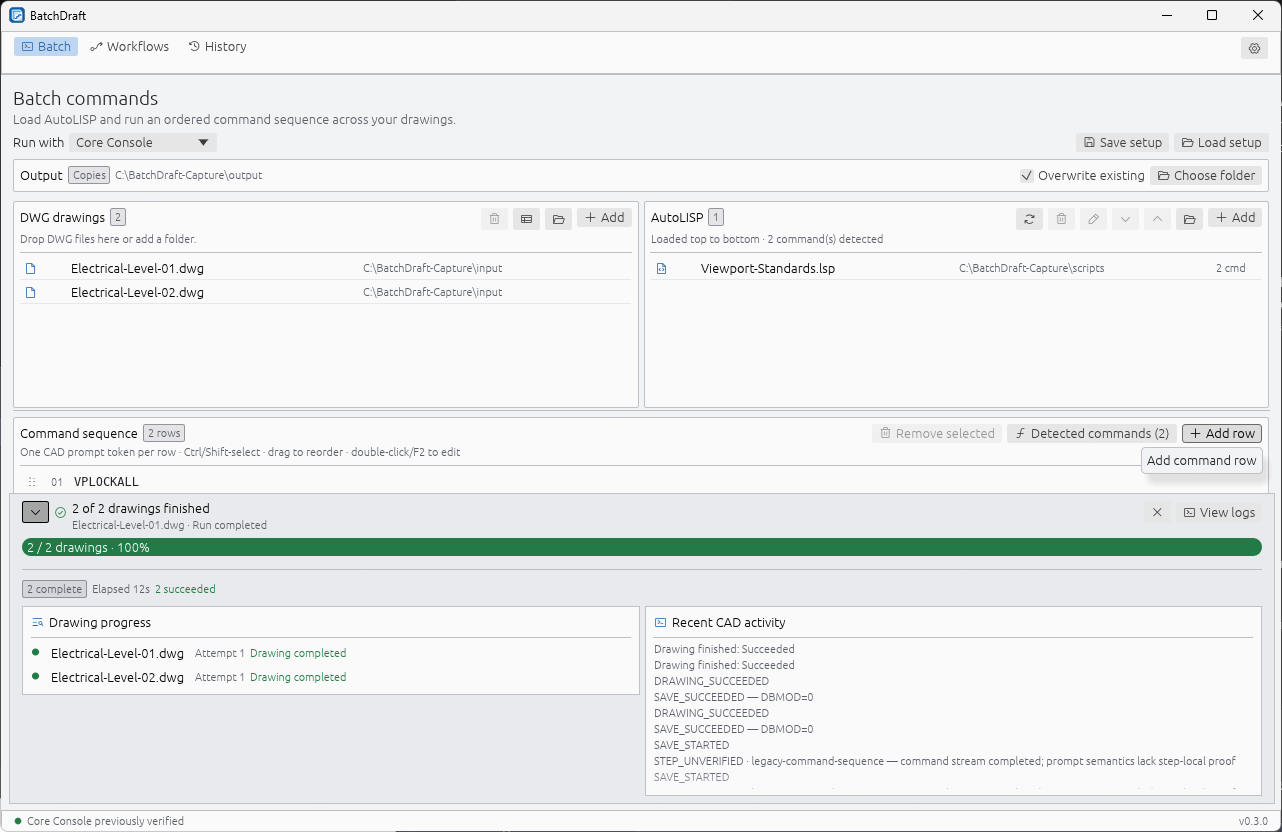
Choose your drawings, load the work, then inspect the output. Start with a small set in Copies mode and build a setup you can repeat.
A recorded walkthrough is in preparation. Follow the written guide to configure your CAD host and check your first batch.
Read the getting-started guide →Add individual DWGs or a folder, then choose copies or deliberate in-place processing.
AutoCAD Core Console can process several drawings concurrently using the configured worker count.
See the outcome, attempts and retained log for every drawing, including failures that need attention.
Run approved AutoLISP and CAD commands across multiple DWG files, supervise the batch, and keep a clear result for each drawing.
Add approved AutoLISP files, arrange CAD prompt commands in order, or choose a reusable guided workflow.
AutoCAD Core Console can use multiple configurable workers to process several DWGs concurrently within one batch.
Work on staged copies in an output folder, or deliberately choose in-place processing when the workflow requires it.
Review the outcome, attempts, warnings and readable or raw logs for each DWG after the batch finishes.
Every paid plan includes the full product. Plans differ by seat count and support, not artificial feature gates.
This installer is currently unsigned. Windows SmartScreen may warn before installation. Verify the published SHA-256 checksum if you want to confirm the download byte-for-byte.
Download checksum531C6F485FBF7ECBF4804F4AE110C723E0D45A94E381AFF3C9BA01E9AC41173CFor independent engineers and drafters.
For small drawing offices and project teams.
For established engineering organisations.
All prices are annual and shown in Australian dollars. Local currency estimates use the latest daily European Central Bank reference rates and are for comparison only. Online checkout and subscription management are coming soon.
Start with practical guides to AutoLISP, Core Console and reusable setups. Each guide describes the published trial, with its current limits.
Choose your CAD host, output defaults, workers, retries, timeouts, log retention and interface preferences.
Read the guide →Load AutoLISP in order, add command responses, use copies, and review each drawing’s result.
Read the guide →Choose the installed runtime, understand headless limitations, and configure parallel workers.
Yes. Add individual DWG files or a folder, load approved AutoLISP files, arrange any CAD commands in order, and run the same work across the selected drawing set. BatchDraft works as an AutoLISP batch runner and CAD command runner for repeatable DWG work.
Yes. AutoCAD Core Console mode supports configurable parallel workers, allowing several drawings within one batch to be processed concurrently. Headless BricsCAD also uses configured workers; windowed hosts use one worker. The trial accepts up to ten drawings per run.
Copy mode stages work in an output folder and publishes an output only after a successful run. In-place mode is deliberate and cannot promise rollback if a CAD command partially changes a drawing before failing.
The current recorded real-run evidence covers AutoCAD LT 2026 Core Console and focused BricsCAD V26 testing. Other valid AutoCAD and Core Console installations can be detected and selected, but do not yet have the same recorded real-run coverage. Windowed AutoCAD execution remains experimental.
Yes. Complete the short trial-access form and the Windows download starts immediately. The trial includes the Command library, configurable drawing updates and PDF plotting. It lasts 30 days from first launch, with a limit of ten drawings per preview or run.
Try BatchDraft for 30 days and process up to ten drawings per run. The installer is unsigned, so Windows SmartScreen may show a warning.