Troubleshoot BatchDraft runs and installation
Check missing CAD runtimes, blocked AutoLISP files, stalled commands, trial limits and unexpected output using BatchDraft’s drawing-level history and logs.
For Trial 0.2.0 · UpdatedStart with the failed drawing and its attempt in History. Read the command output and warnings, then compare the actual output folder and drawing with the work you expected. Repeat checks on disposable drawings or in Copies mode.
Read a drawing’s log
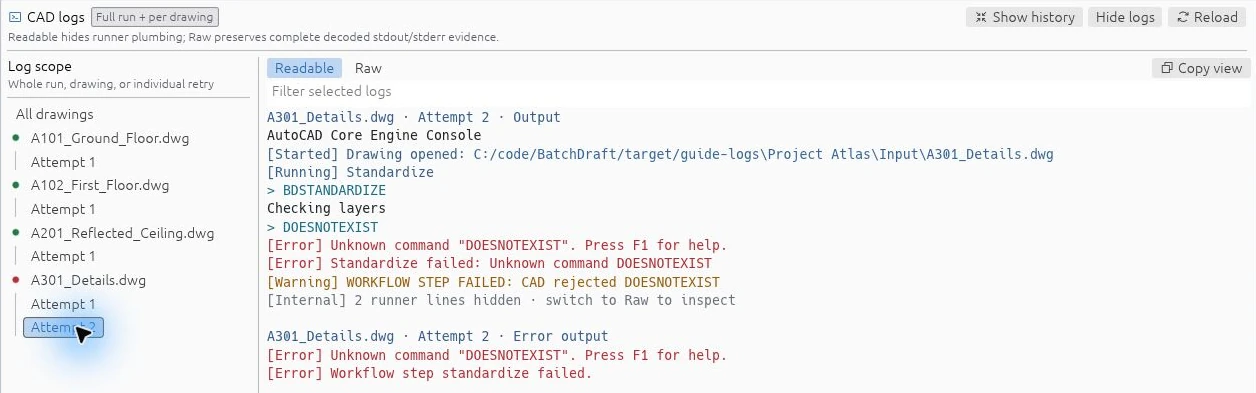
Select the run in History, open its logs, then choose the drawing and individual attempt. Use Readable for command output and warnings; switch to Raw for the decoded stdout and stderr evidence. The filter narrows the selected view.
Demonstration log data: this captured example uses generated sample history to show an unknown-command failure. It is not a customer run or a newly executed CAD failure.
The CAD executable is not found
Open Settings and run Detect installed versions. For AutoCAD / Headless, browse to the installed product’s accoreconsole.exe if needed. DWG TrueView by itself is not a supported automation runtime.
For BricsCAD, select the installed bricscad.exe. The selected directory needs the matching machine registration and an initialized user profile. See runtime setup and evidence before assuming another version is covered.
A command stalls or wants a dialog
Core Console cannot answer a desktop dialog. Use the command-line variant where one exists and put every required prompt response on its own row. An explicit <ENTER> row supplies a blank or default response.
Check the last command and prompt in the retained log. Verify the routine with the selected runtime on a small drawing set. Increasing retries or timeouts does not resolve an incompatible routine or a missing response. Windowed AutoCAD exists as an experimental path and is not a generally verified substitute.
AutoLISP is blocked or the command is missing
Review the file and confirm that its location is allowed by your AutoCAD security policy. Keep Respect AutoCAD as the normal SECURELOAD choice.
Check that the right .lsp file is in the batch, supporting files load first, and the command you want is actually called by the sequence. Adding a file and invoking one of its commands are separate actions. Command discovery identifies definitions but cannot prove successful loading or runtime compatibility.
The drawing did not change or output is missing
Confirm whether the batch used Copies or In place. Check the configured destination and whether an existing file caused a collision or overwrite decision.
Copies mode publishes an output only after a successful run. Inspect the drawing’s attempts and warnings in History rather than relying on a clean process exit. In-place work can partially change the source before a failure, so use your independent backups when you need to recover an original.
The trial refuses the drawing set
The published 0.2.0 trial allows at most ten drawings per preview or run. Check the full imported list, including drawings added through a folder. The same limit applies when loading a saved setup or preparing a workflow.
Use a smaller representative set to evaluate the workflow. Trial 0.2.0 also ends 30 days after first launch. If the app says Trial expired, History and Settings remain available, but new previews and runs are disabled. Reinstallation does not reset the clock. If it says Trial unavailable, contact support and retain the diagnostic details instead of deleting local trial data.
Windows warns about the installer
The current installer and executable are unsigned, so SmartScreen may warn. Use the versioned trial and published checksum, verify the source and file, and decide whether to continue. Do not disable Windows security settings as a general installation step.
Prepare a useful support request
Email [email protected] with:
- Your BatchDraft version, Windows version, CAD product and version, and execution mode.
- Whether you used Copies or In place, and what you expected to happen.
- The stage or command where the issue occurred and whether it repeats on a disposable drawing.
- Relevant, sanitised error text from the drawing attempt.
Remove customer drawing information, personal paths, credentials and other sensitive material before sharing logs or screenshots. Begin with the error text; a full customer drawing set is not needed for an initial report.
Use the included configurable tools
Trial 0.2.0 includes the Command library. Follow the dedicated guides for bulk drawing updates and plotting, collecting and combining PDFs. They explain the configuration forms, report-only checks, editable steps and where to find the results.
This guide covers Trial 0.2.0: 30 days from first launch, up to ten drawings per preview or run.